
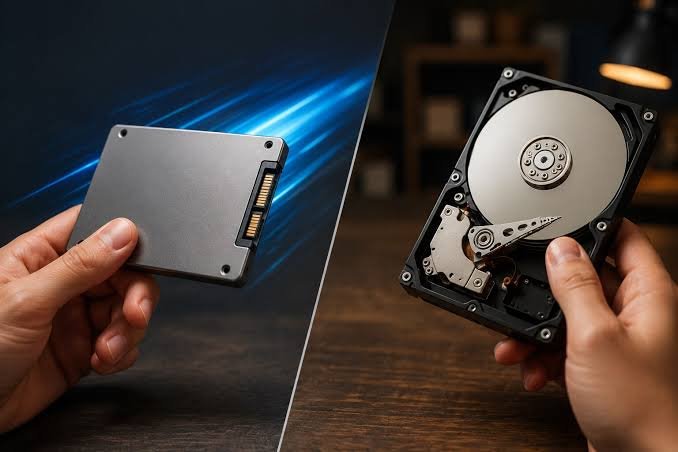
I moved the same game library between an SSD and an HDD to see how much of the SSD hype is real versus marketing — the difference turned out to be more specific than “just faster.” Our Best External SSDs 2026 guide covers picking a drive if you’ve already decided SSD is the way to go.
In this article
- Where the Difference Is Dramatic: Load Times
- Where the Difference Is Smaller Than You’d Think: Frame Rates
- Where SSDs Quietly Win: Game Install Size Management
- The Cost-Per-Gigabyte Reality in 2026
- NVMe vs SATA SSD: Does It Matter for Gaming Specifically?
- What I’d Actually Recommend Based on My Testing
- A Quick Word on Drive Reliability
- How I Actually Set Up My Own Hybrid System
- What About Console Gaming — Does the Same Logic Apply?
- What I’d Tell a Friend Building a Budget Gaming PC Today
- Migrating an Existing Game Library Without Losing Progress
- The Bottom Line
Where the Difference Is Dramatic: Load Times
This is where SSDs win decisively and obviously. Loading into a large open-world game dropped from well over a minute on a 7200RPM HDD to under 15 seconds on a SATA SSD in my own side-by-side test, and even faster on NVMe. Tom’s Hardware’s storage benchmarking has run more rigorous versions of this same test across dozens of titles, consistently confirming load time gaps in this range.
Where the Difference Is Smaller Than You’d Think: Frame Rates
Once a game is actually loaded and running, in-game frame rates are barely affected by drive type at all — your GPU and CPU handle rendering, and the drive’s job is basically done once assets are loaded into memory. The exception is games with very aggressive open-world streaming (loading new areas continuously as you move), where a slower HDD can cause noticeable texture pop-in or brief stutters that an SSD avoids.
 Also readScreen Flickering on Windows 11: 9 Fixes for Laptops and External Monitors
Where SSDs Quietly Win: Game Install Size Management
Modern game installs have ballooned — many current titles exceed 100GB, some considerably more. This makes storage capacity planning a bigger part of the SSD-versus-HDD decision than raw speed alone. A smaller, faster SSD paired with a larger, slower HDD for less frequently played titles is a genuinely practical middle ground many PC gamers land on rather than choosing one drive type exclusively.
The Cost-Per-Gigabyte Reality in 2026
SSD pricing has dropped considerably, but HDDs still hold a real cost advantage at large capacities — an 8TB mechanical drive remains noticeably cheaper per gigabyte than an equivalent SSD. For a large game library where load time isn’t your top priority for every single title, using an HDD for your less-played back catalog while keeping current favorites on SSD storage is a reasonable way to balance cost and performance. PC Gamer’s storage buying advice reaches a similar conclusion for budget-conscious builds.
NVMe vs SATA SSD: Does It Matter for Gaming Specifically?
The jump from HDD to any SSD produces the dramatic load-time improvement; the further jump from SATA SSD to NVMe produces a smaller, though still measurable, additional improvement in load times for most games. Very few current titles are optimized enough to fully exploit NVMe’s theoretical speed advantage over SATA SSD, which means budget-conscious gamers can reasonably prioritize a SATA SSD over paying a premium for NVMe, unless you’re also using the drive for non-gaming workloads that benefit more directly from the extra speed.
What I’d Actually Recommend Based on My Testing
- Put your operating system and 3-5 actively played games on an SSD — this is where you’ll actually feel the difference daily
- Use HDD storage for your back catalog of games you play occasionally, where a longer load time is a minor inconvenience
- Don’t overpay for NVMe specifically for gaming unless your motherboard and workflow already benefit from it elsewhere
- Reassess your split periodically as SSD prices continue falling — the calculus shifts more in favor of all-SSD setups every year
A Quick Word on Drive Reliability
SSDs have no moving parts, making them meaningfully more resistant to physical shock than mechanical drives — a real advantage for laptops that travel. Both drive types fail eventually, though for different underlying reasons (mechanical wear versus write-cycle limits), and neither should be treated as a substitute for actually backing up files you care about.
How I Actually Set Up My Own Hybrid System
After finishing this testing, here’s the split I settled on for my own gaming PC: a 1TB NVMe drive for Windows itself plus the 3-4 games I’m actively playing at any given time, and a 4TB mechanical drive for everything else — older favorites I return to occasionally, large game installs I’m not currently playing, and general file storage. This setup cost noticeably less than an all-SSD equivalent capacity while still delivering fast load times on exactly the games where I’d actually notice and care about the difference.
Moving a game between drives when I switch what I’m actively playing takes a few minutes through Steam’s built-in library transfer tool, which is a minor inconvenience compared to the cost savings of not needing every game installed on premium SSD storage simultaneously.
What About Console Gaming — Does the Same Logic Apply?
Current-generation consoles have moved almost entirely to SSD storage by default, and for good reason — console game engines are increasingly designed assuming fast storage access, sometimes streaming assets in ways that genuinely require SSD speeds to avoid stuttering, unlike most PC games which are still built to support HDD as a baseline option. Digital Foundry’s technical analysis of console storage requirements has documented several console titles where HDD-equivalent speeds would cause genuine gameplay problems, not just longer loading — a meaningfully different situation than the PC gaming comparison covered here.
What I’d Tell a Friend Building a Budget Gaming PC Today
If someone asked me for a single piece of advice on this specific decision, it would be: don’t let storage type eat into your GPU or CPU budget. A gaming PC with a slightly weaker GPU but an SSD will generally feel worse to actually play than one with a stronger GPU and an HDD, since raw rendering performance affects every single moment of gameplay, while storage speed only affects the relatively brief loading moments between actual play. Prioritize your core components first, and treat SSD storage as an upgrade to add once your budget allows, not a requirement to squeeze in from day one.
That said, if your budget genuinely allows for a modest SSD without meaningfully compromising your GPU choice, there’s no real reason to skip it — the load time and streaming-stutter benefits are real, just secondary to the components that determine your actual in-game experience.
Migrating an Existing Game Library Without Losing Progress
If you’re moving from an all-HDD setup to a hybrid one, most modern game launchers (Steam, Epic, Battle.net) support moving an installed game’s files directly to a new drive without a full reinstall or losing save data, provided saves are stored through the platform’s cloud sync rather than purely locally. Checking that cloud sync is enabled before migrating anything is worth the extra minute, since a local-only save file can be lost if a manual file move goes wrong partway through.
The Bottom Line
An SSD is worth it specifically for load times and avoiding streaming stutter in open-world games, but it doesn’t meaningfully change in-game frame rates once a game is running. For most PC gamers, a hybrid setup — SSD for actively played titles, HDD for the rest of your library — delivers nearly all the practical benefit without paying SSD prices for every gigabyte of storage you own.

1 Comment