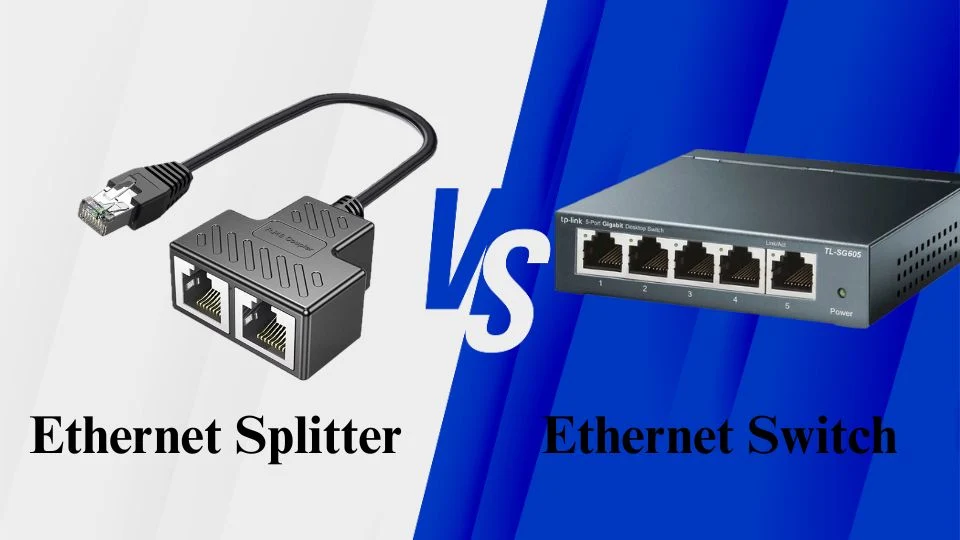
A router with only four Ethernet ports and six devices that genuinely need a wired connection is a genuinely common problem, and the two cheapest-looking solutions — a splitter or a switch — are not remotely interchangeable, despite looking similar in a search results page.
In this article
- What an Ethernet Splitter Actually Does
- Why Splitters Come With a Genuine Speed Penalty
- What an Ethernet Switch Actually Does
- The One Real Trade-Off With Switches
- When a Splitter Is Actually the Right Call
- When You Should Use a Switch Instead
- A Buying Mistake Worth Avoiding
- How This Connects to Broader Home Network Planning
- Frequently Asked Questions
- The Bottom Line
What an Ethernet Splitter Actually Does
An Ethernet splitter is a simple, unpowered device that divides a single cable’s four twisted wire pairs into two separate two-pair connections, according to Engadget’s detailed technical breakdown. Because most gigabit-speed devices need all four pairs to reach full speed, this only works cleanly with older, slower connections, and it requires two splitters, one at each end of the cable run, to actually function — using just one leaves one of your two devices unable to connect at all.
Why Splitters Come With a Genuine Speed Penalty
A passive splitter doesn’t add any real networking intelligence to a connection — it simply shares the same physical bandwidth between two devices rather than giving each its own dedicated pathway. This is the single biggest reason splitters have a real reputation for connection instability and reduced speed: two devices are genuinely competing for the same limited pipe, not each getting their own.
 Also readMeta’s New Personal Agent Protocol: 7 Things to Know Before You Let AI Shop for You
What an Ethernet Switch Actually Does
A switch is a genuinely more capable device, according to SlashGear’s comparison of the two technologies, using what’s called packet switching to actively manage data flow — reading each data packet’s header information and directing it specifically to the correct destination device, rather than blindly sharing bandwidth. Switches connect to a single port on your router but then provide multiple additional ports, commonly four to eight, sometimes considerably more, each capable of full connection speed.
The One Real Trade-Off With Switches
Switches require their own power source, unlike splitters, which need no external power at all. This is a genuinely minor inconvenience compared to the performance and reliability difference, but it does mean finding an outlet near wherever you’re placing the switch, which matters if you’re setting one up in a location without easy power access.
When a Splitter Is Actually the Right Call
According to a detailed use-case breakdown, a splitter genuinely makes sense in a few specific, narrow scenarios: you have exactly one Ethernet cable run in a wall but need two connections at both ends, the devices involved don’t need gigabit speeds (an older printer or a basic VoIP phone on a 100 Mbps connection, for example), or you need the absolute cheapest possible fix and are willing to accept a real speed trade-off.
When You Should Use a Switch Instead
In almost every other realistic scenario, a switch is the better choice — specifically whenever you need more than two additional connections, want full gigabit or faster speeds for streaming, gaming, or large file transfers, or want to build out a genuinely reliable home network rather than a temporary workaround. Given how affordable basic 5-to-8-port switches have become, the cost difference versus a splitter rarely justifies accepting a splitter’s real performance limitations.
A Buying Mistake Worth Avoiding
When shopping for a switch specifically, watch out for network hubs, which look nearly identical to switches but lack the same packet-switching intelligence, broadcasting data to every connected device rather than directing it specifically to the intended recipient. This creates the same kind of congestion and performance issues a splitter has, despite a hub’s larger number of physical ports suggesting otherwise. This same “looks similar but performs very differently” trap shows up in how laptop and desktop GPUs sharing the same model name perform very differently, where checking real specifications, not just a product’s category label, is the only reliable way to know what you’re actually buying.
How This Connects to Broader Home Network Planning
Choosing between a splitter and a switch is really a smaller decision inside a larger home networking setup question, similar to what we’ve covered in what to actually look for in a mesh Wi-Fi system — getting the underlying network infrastructure right matters more for daily reliability than any individual device’s marketing claims. This same infrastructure-first thinking applies directly to [CLIENT LINK PLACEHOLDER] broader home office and smart-home network planning, where a handful of small, correct hardware choices compound into a much more reliable overall setup.
This same principle of checking real specs before buying applies broadly across networking gear, similar to what we’ve covered in how AI is quietly becoming the infrastructure behind smart homes — the underlying network and infrastructure layer matters more for daily reliability than any individual device’s headline marketing claim.
Frequently Asked Questions
Can I connect three or more devices using an Ethernet splitter?
No — a splitter supports exactly two devices per pair of splitters. For three or more connections, a switch is the only practical option, since switches commonly offer four, eight, or more ports.
Will using a switch slow down my overall internet speed?
No — a switch maintains full network speed for each connected device, provided your actual internet connection itself isn’t the bottleneck. Unlike a splitter, a switch doesn’t force devices to share bandwidth.
The Bottom Line
A splitter is a narrow, budget workaround for a very specific problem — one existing cable, two low-speed devices, minimal cost — while a switch is the genuinely correct choice for almost everyone else who needs to expand their wired network reliably. Given how inexpensive basic switches have become, the splitter’s cost advantage rarely outweighs its real performance and reliability trade-offs.