9 Phone Battery Habits That Actually Matter (and 5 Myths You Can Ignore)

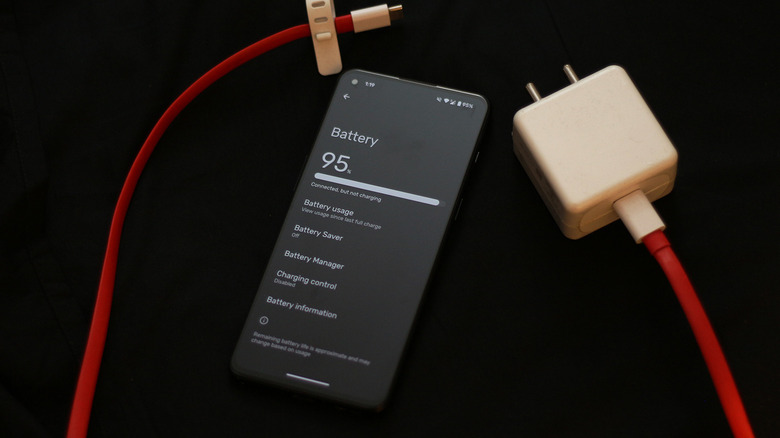
Phone battery advice online is a mess. One post says never charge overnight, another says never let it reach 20 percent, and a third swears by closing every app. Some of it is outdated, some is half true, and a few habits genuinely extend how long your battery stays healthy. Here is a plain-English guide to what matters, starting with a simple fix that many people miss: a weak signal makes your phone work harder, so read our Wi-Fi speed guide if your connection at home is unreliable.
How a Phone Battery Actually Ages
Modern phones use lithium-ion batteries, which slowly lose capacity as they go through charge cycles and as they are exposed to heat. A cycle is roughly one full charge’s worth of use, not one plug-in. Apple, for example, publishes battery guidance on its batteries page explaining that capacity declines with age and that heat is one of the biggest enemies.
That gives us the rule behind most good habits: reduce heat, avoid unnecessary extremes, and let your phone’s built-in protections do their job.
Habit 1: Keep the Phone Cool
Heat does more long-term damage than almost anything else. Do not leave your phone on a car dashboard, under a pillow while charging, or in direct sun. If a case traps heat while you game or charge, take it off. A warm phone is normal; a hot one is a warning.
Habit 2: Turn On Optimized or Adaptive Charging
Most current phones offer a feature that learns your routine and slows charging near 100 percent, or lets you cap the charge level. Names vary by brand, such as Optimized Battery Charging on iPhone or Adaptive Charging and battery-protection options on many Android phones. Enable it in the battery settings, especially if you charge overnight.
Habit 3: Use a Good, Certified Charger
Cheap, uncertified chargers can deliver unstable power and run hot. Use the charger and cable that came with the phone or a reputable certified replacement. If a cable is frayed, bent, or gets unusually hot, replace it.
Habit 4: Do Not Stress About Small Top-Ups
Lithium-ion batteries do not need to be run to zero. Short top-ups are perfectly fine and can even be gentler than deep discharges. Avoid making a habit of draining the phone to 0 percent, and avoid leaving it fully drained for days.
Habit 5: Lower Screen Brightness and Refresh Rate
The display is usually the biggest power user. Let auto-brightness work, and shorten the screen timeout. On phones with high refresh rate screens, switching from 120 Hz to the standard setting can noticeably stretch battery life if you do not need the extra smoothness.
Habit 6: Check Which Apps Actually Drain Power
Open the battery section in your settings and look at usage by app. If something you barely use appears near the top, restrict its background activity or uninstall it. Apps that constantly refresh, track location, or play audio silently are common culprits.
Habit 7: Limit Background Refresh and Location Access
Set location access to “while using the app” for most apps, and turn off background refresh for ones that do not need it. This reduces both battery use and how much data apps collect, which is a nice privacy bonus.
Habit 8: Keep Your Software Updated
Updates often include battery and power-management fixes. Keep in mind that battery life can dip for a day or two after a big update while the phone re-indexes photos and apps, so give it a moment before you panic.
Habit 9: Know When to Replace the Battery
Check battery health where your phone shows it, such as Battery Health on iPhone or the battery health page on supported Android phones. When capacity drops to roughly 80 percent or the phone shuts down unexpectedly, a battery replacement often costs far less than a new phone. Back up your data first, and our cloud storage guide can help you choose a place to keep it.
5 Battery Myths You Can Ignore
- Myth: Closing all background apps saves battery. Reality: reopening apps from scratch often uses more power than leaving them suspended.
- Myth: Charging overnight ruins the battery. Reality: modern phones stop charging when full, and heat matters more than time on the charger.
- Myth: Fast charging always destroys batteries. Reality: it creates more heat, so keep the phone cool and avoid charging under a blanket.
- Myth: Dark mode always saves power. Reality: it helps mainly on OLED screens.
- Myth: You must calibrate a new battery by draining it fully. Reality: modern phones do not need this.
A Simple Weekly Battery Routine
Once a week, glance at your battery usage list, delete one app you do not use, and check for updates. Once a month, look at battery health and clean your charging port gently if charging feels loose. These small checks take minutes and prevent most avoidable problems.
Where to Find Battery Settings on iPhone and Android
On an iPhone, open Settings, then Battery, to see usage by app, a low power mode toggle, and Battery Health under the same menu. On Android, open Settings, then Battery, where you will usually find usage stats, battery saver, and adaptive or protection options, although the names change between Samsung, Google, and other brands. If you cannot find a feature, search the settings menu using the feature’s name.
How Signal Strength and Network Choice Affect Battery
When signal is weak, your phone boosts its radio power to stay connected, which quietly burns battery. In poor coverage areas, connecting to Wi-Fi saves power, and on Wi-Fi at home a stable network matters too. If you rarely need the fastest mobile data, switching between standard and high-speed modes, where your phone offers the choice, can also help.
When Battery Saver Modes Help and When They Do Not
Battery saver or low power mode reduces background activity, dims the screen, and limits some visual effects. It is useful when you are away from a charger and need the phone to last. It is less useful as a permanent setting, because it can delay email, pause background updates, and make the phone feel slower.
What to Do If Your Battery Drains Overnight
- Restart the phone to clear stuck processes
- Check battery usage for an app that ran overnight
- Turn off background refresh for the offender
- Disable unnecessary notifications and location tracking
- Update the app and the phone software
- Consider a battery service if health has dropped noticeably
Normal overnight loss for an idle phone is small, so a big drop suggests a problem app, poor signal, or an ageing battery.
Charging While Traveling and Using Power Banks
Travel puts stress on batteries through heat, poor signal, and constant navigation use. Carry a reputable power bank, keep the phone out of direct sun, and use airplane mode in areas with no coverage. Choose power banks and cables from established brands, and never charge a phone that is swollen, leaking, or badly damaged.
Battery Replacement or a New Phone: How to Decide
If the phone is otherwise fast, gets software updates, and has an intact screen, a new battery usually delivers the best value. If it is out of updates, slow even with a fresh battery, or has other faults such as a cracked screen and a weak camera, put the repair money toward a replacement instead. Ask for a written quote from an authorised or well-reviewed repairer before deciding.
Software Habits That Save Power Without Ruining the Experience
- Use Wi-Fi at home and work instead of mobile data where possible
- Turn off features you never use, such as always-on display, if your phone offers the option
- Stream downloaded content rather than streaming over weak signal
- Uninstall apps that constantly send notifications
- Restart the phone occasionally to clear stuck processes
Small changes like these add up across a whole day, and none of them requires giving up features you actually enjoy.
How to Read Battery Health Numbers Sensibly
A battery health figure shows how much capacity remains compared with when the phone was new. A drop to the high 80s or 90s after a year or two is completely normal. Worry when the figure approaches 80 percent and you also notice shutdowns, sluggishness, or a battery that will not last the day, because that is when a replacement gives a clear improvement.
Frequently Asked Questions
Is it bad to use my phone while it charges?
Light use is fine, but heavy gaming while charging creates heat, which is what you want to avoid.
Should I keep my phone between 20 and 80 percent?
It can help slightly, and battery-protection settings make it easy, but it is not essential for normal use.
How long should a phone battery last?
Most batteries stay useful for a few years of daily use. Check your manufacturer’s published figures, since cycle life differs by model.
The Bottom Line
Battery health comes down to heat, sensible charging, and a few settings, not superstition. Turn on adaptive charging, use good accessories, watch app behaviour, and replace the battery when health drops. For more practical phone guides, visit DailyTechReview.
Related Stories
 Smartphones
 How to Tell If Your Old Phone Is Still Worth Keeping in 2026
5 days ago Smartphones
 iPhone 18 Pro Launch: Everything You Need to Know About Apple’s First Foldable Push
2 weeks agoiPhone Duo: Apple’s First-Ever Foldable iPhone — Price, Specs, and Everything You Need to Know
3 weeks ago Smartphones
 Apple’s Redesigned Siri for iPhone 18: What We Know So Far
3 weeks ago Smartphones
 iPhone 18 Pro & Pro Max: Full Price (USD, PKR, INR), New Features & Battery Life
3 weeks ago