
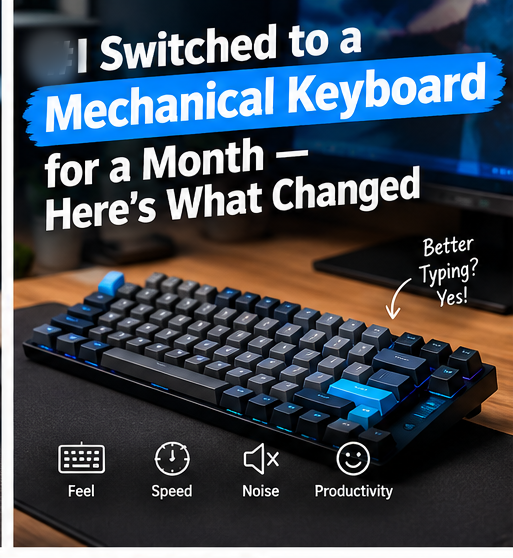
Mechanical keyboards have a loyal following, and no shortage of hype claiming they’ll transform your typing forever. I swapped my standard membrane keyboard for a mechanical one for 30 straight days of actual work — writing, coding, and everything in between — to find out what’s genuinely different and what’s just marketing.
Why I Actually Did This
I write for a living, which means 6-8 hours of typing most days. If a keyboard switch was going to meaningfully affect comfort, speed, or fatigue, this was the right test to find out — not a quick 20-minute demo at a store.
Week One: The Adjustment Period Is Real
The first few days were rougher than I expected. Mechanical switches have a different actuation point and travel distance than most membrane keyboards, and my typing accuracy actually dropped slightly in the first two or three days — more mistyped letters, especially on keys I habitually rest fingers near. This settled by day four or five, but it’s worth knowing upfront rather than assuming instant improvement.
What Actually Improved
Typing accuracy, once adjusted, was noticeably better. The tactile feedback on each keypress made it easier to feel when a key had registered, which reduced the double-typed letters I regularly got on my old membrane board when typing quickly.
Fatigue over long sessions decreased slightly. This surprised me — I expected no difference, but by week three, multi-hour writing sessions felt marginally less tiring on my fingertips. This is subjective and likely varies by switch type and individual typing style, but it was consistent across the month.
I became more deliberate about typing speed. Mechanical keys, especially with a heavier actuation force, naturally slowed my top typing speed by a small margin, but increased overall accuracy — a trade-off that ended up being a net positive for editing-heavy writing work.
What Didn’t Change (Despite the Hype)
My actual words-per-minute didn’t meaningfully increase. Several enthusiast claims suggest mechanical keyboards make you faster. In my case, average typing speed stayed within a few WPM of my baseline — the benefit was in accuracy and feel, not raw speed.
It didn’t fix wrist or hand pain. I don’t have chronic RSI issues, so I can’t speak to that specific use case, but for general comfort, an ergonomic keyboard shape likely matters more than switch type alone if pain is your primary concern.
The Noise Factor Is a Genuine Trade-off
This is the part reviews sometimes gloss over: mechanical keyboards, especially with clicky switches, are noticeably louder than membrane boards. Working from a shared space or on video calls, this became a real consideration — I ended up switching to a quieter linear switch type partway through the test specifically because the noise was distracting to people around me.
Switch Types Matter More Than “Mechanical vs Membrane”
The biggest lesson from this month wasn’t mechanical-versus-membrane — it was how much switch type alone changes the experience. Linear switches (smooth, no tactile bump) felt closest to a membrane keyboard but with better durability and consistency. Tactile switches (a noticeable bump at actuation) gave the accuracy benefit I mentioned above. Clicky switches added an audible click on top of the tactile bump, which I found excessive for daily office-adjacent use but can see the appeal for solo home use.
Is It Worth the Cost?
Decent mechanical keyboards start around $50-70, with well-regarded options in the $80-130 range offering hot-swappable switches (letting you change switch types without soldering) — useful if you’re not sure which switch feel suits you yet. At the low end, this is a reasonable one-time cost for daily use; the keyboard itself typically outlasts several membrane keyboards thanks to more durable switch mechanisms rated for tens of millions of keystrokes.
Who Should Actually Make the Switch
If you type for extended periods daily and work somewhere noise isn’t a concern, a mechanical keyboard with tactile or linear switches is a worthwhile one-time investment. If you work in a shared office, open-plan space, or take frequent video calls, either choose linear switches specifically or stick with a quality membrane or low-profile keyboard, since click noise genuinely affects people around you.
Final Verdict
The switch was worth it for me specifically because of the accuracy improvement during long writing sessions, not because of any dramatic speed increase. If you’re considering it purely for a productivity boost, temper expectations — the real benefit is comfort and feel over time, which is harder to quantify but genuinely noticeable after a full month of daily use.
What I’d Tell Someone Considering the Switch
If you’re on the fence, my honest advice is to try a hot-swappable board with a small variety pack of switches before committing to a single switch type blind. The month taught me that switch feel is genuinely personal — a colleague who tried my linear-switch board for a day preferred the tactile bump I’d initially found too aggressive, which reinforced that there’s no single “correct” mechanical keyboard experience, only what suits your specific typing style and environment.
Cleaning and Maintaining a Mechanical Keyboard
One underrated advantage that emerged over the month: mechanical keyboards are considerably easier to clean thoroughly than membrane boards, since many keycaps pull off individually with a simple keycap puller for underneath cleaning, without risking the entire keyboard’s function the way prying into a laptop’s built-in membrane keyboard can. If you eat at your desk regularly, this alone is a meaningful practical advantage beyond typing feel.
Desk Setup Considerations
A mechanical keyboard’s taller profile compared to most laptop and slim membrane keyboards means a wrist rest becomes more worthwhile for comfortable typing angles, something I didn’t anticipate needing until week two. A simple padded or wooden wrist rest matched to your keyboard’s width made a noticeable comfort difference during long sessions and is worth budgeting a small amount extra for alongside the keyboard itself.
Frequently Asked Questions
Do mechanical keyboards really last longer than membrane keyboards? Yes, generally — mechanical switches are commonly rated for 50-100 million keystrokes per key, compared to roughly 5-10 million for typical membrane keyboards.
Is a mechanical keyboard worth it just for gaming? Many gaming-focused mechanical keyboards use linear switches for faster, more consistent actuation, which can be a genuine advantage in fast-paced games, though the difference is more noticeable to competitive players than casual ones.
Can I try different switch types without buying multiple keyboards? Hot-swappable keyboards let you physically replace individual switches without soldering, which is the easiest way to test different feels before committing.
For more hands-on tech reviews like this, browse our Gadgets category.
External reference: keyboard switch durability figures are commonly cited from manufacturer datasheets published by switch makers such as Cherry MX{:target=”_blank” rel=”nofollow noopener”}.